Video doorbells with no monthly fee: eufy vs Ring vs Reolink
Top picks
 NoSubHQNo photo yet
- Subscription-free Yes
- No account Yes
- Works offline Partly
- Price as found US$119.99 · CA$127.99
NoSubHQNo photo yet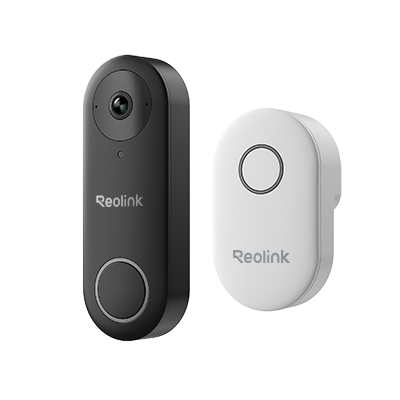
- Subscription-free Yes
- No account Not verified
- Works offline Partly
- Price as found US$149.99 · CA$169.99
NoSubHQNo photo yet- Subscription-free Yes
- No account No
- Works offline Partly
- Price as found US$144.99 · CA$152.99
A video doorbell should let you see who is at the door, talk to them, and play back the visit later. Ring will do the first two without a paid plan. Saving the video is the part Ring asks you to subscribe for. eufy and Reolink record to storage you own and say a monthly plan is not required for that recording. Over three years, that difference is larger than the gap in hardware prices.
The three-year cost
Official US store prices, checked on November 20, 2026. Ring’s regular price is the store’s compare-at price. Annual plan rates are used where offered. Taxes are not included.
| Doorbell | Current US hardware | Regular US price, if shown | Required plan to save video | 3-year total at current price | 3-year total at regular price |
|---|---|---|---|---|---|
| Ring Battery Doorbell 2K + Ring Solo | $39.99 (sale) | $99.99 | Solo: $4.99/month or $49.99/year for one device | $39.99 + 3 × $49.99 = $189.96 | $99.99 + 3 × $49.99 = $249.96 |
| Same doorbell + Ring Multi | $39.99 (sale) | $99.99 | Multi: $9.99/month or $99.99/year for all devices at one location | $39.99 + 3 × $99.99 = $339.96 | $99.99 + 3 × $99.99 = $399.96 |
| eufy Video Doorbell E340 | $169.99 | $169.99 | None for on-device recording | $169.99 | $169.99 |
| Reolink Video Doorbell WiFi | $89.99 | Not shown | None for local recording | $89.99 | $89.99 |
| Reolink Video Doorbell PoE | $95.99 | Not shown | None for local recording | $95.99 | $95.99 |
Even at today’s $39.99 sale, three years of Ring Solo still costs more than the eufy E340. The Reolink Wi-Fi doorbell is the least expensive of the group, as long as you can hardwire it. In Canada, Ring Solo is CAD$5.99 a month or CAD$59.99 a year, and Ring Multi is CAD$14.99 a month or CAD$149.99 a year, plus tax.
How the doorbells compare
| Feature | eufy E340 | Ring Battery Doorbell 2K | Reolink WiFi | Reolink PoE |
|---|---|---|---|---|
| Resolution | 2K, dual cameras (face and package view) | 2K, with up to 6× enhanced zoom | 2K+ / 5 MP, chime in the box | 2K+ |
| Power | Battery or existing wiring (8–24 V, greater than 10 VA) | Built-in rechargeable battery (USB-C) | Hardwired only: included adapter or 12–24 V AC / 24 V DC wiring | Power over Ethernet, or existing wiring for power |
| Local recording without a plan | 8 GB on the device | Ring recommends a plan for video recording | Yes, including 24/7 local recording | Yes; “No Monthly Fees For Local Storage” |
| Optional paid plan | Optional eufy cloud backup | Ring Protect: 180-day playback, smart alerts, Device Modes | Optional Reolink Cloud in selected countries | Optional Reolink Cloud in selected countries |
| Existing mechanical chime | Yes, or a HomeBase / MiniBase chime | Live view, two-way talk, and motion alerts are listed on the product page | No; use the Reolink chime | No; use the Reolink chime |
| Weather rating | IP65 | “Weather resistant” (no full IP number listed) | Waterproof (no numeric IP rating listed) | IP65 |
eufy E340: the straightforward no-subscription doorbell
Our eufy Video Doorbell E340 page has its score. eufy titles the E340 page “Doorbell Camera Without Subscription” and lists it at $169.99, or C$229.99 in Canada. It has two cameras — one for the person at the door and one aimed down at packages — records in 2K with color night vision out to 16 feet (5 metres), and stores video on 8 GB of built-in storage.
You can run it on a removable battery, which eufy says charges in five hours, or on existing doorbell wiring. It works by itself or with a HomeBase S380. Human, package, and face detection are listed on the page. Footnotes say thumbnail previews and optional cloud backup send images to the cloud; neither is required to record on the device. The page also promotes “Includes Free Cloud Backup History (All Devices).” The page does not say how long that offer lasts or what happens when it ends, so don’t count on it.
Ring Battery Doorbell 2K: cheap to buy, not cheap if you want recordings
Ring’s Battery Doorbell 2K (our score) is $39.99, with a compare-at price of $99.99. It offers live view, two-way talk, and motion alerts, plus a free 30-day trial of Ring Protect, which starts when you set up the device unless you already have a plan at that address.
Ring’s official answer to whether a Protect plan is required is no. The same page recommends a plan for “video recording and other advanced features.” Video event history of up to 180 days, person, package, and vehicle alerts, extended live view, and Device Modes are listed as plan features. Ring’s official help article “Understanding Ring Protect subscriptions” says that without a subscription you can view live video and respond to alerts as they happen, a subscription is required to review recorded video, and events are only recorded after you subscribe. Ring Solo is $4.99 a month or $49.99 a year in the United States for one device; Multi at $99.99 a year covers every Ring device at one address. Plans auto-renew until you cancel.
Reolink: the lowest buy-once price, if you can wire it
Reolink sells two wired doorbells that do not require a subscription.
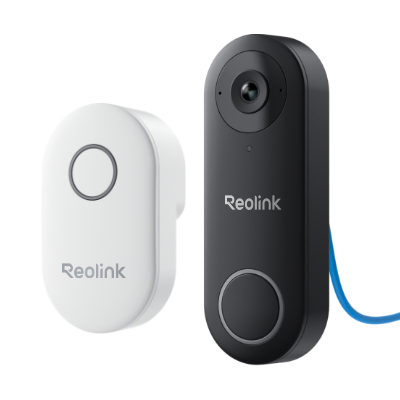
The Video Doorbell WiFi (our score) is $89.99 in the United States and C$118.99 in Canada. The FAQ says it does not require a mandatory subscription and that person and vehicle detection, two-way audio, 24/7 recording, and local storage are available without hidden fees. It is hardwired only, using the included adapter or 12–24 V AC / 24 V DC wiring, and it will not ring a pre-existing mechanical chime.
The Video Doorbell PoE (our score) is $95.99 in the United States and C$104.99 in Canada. The FAQ is blunt: “No, you don’t need any subscription.” It is rated IP65 and, like the Wi-Fi model, will not operate another brand’s mechanical chime. Either doorbell can send footage to a Reolink Home Hub or NVR. Reolink’s specifications list a microSD slot of up to 256 GB but don’t say a card is included, so budget for one.
A fourth option, if you want a hub built in
The Aqara Doorbell Camera Hub G410 (our score) is $144.99 in the United States and C$152.99 in Canada. It is a 2K doorbell and Matter hub that records to a microSD card of up to 512 GB (not included). 24/7 recording needs wired power. Optional HomeGuardian cloud and Apple iCloud+ are extras.
Which one should you buy?
Choose Reolink if you can hardwire a doorbell and want the lowest three-year cost. Pick PoE if you already run Ethernet or a Reolink NVR. Choose eufy if you want a battery doorbell and a second camera aimed at packages; it costs more than Reolink up front, and still less over three years than Ring plus Solo. Choose Ring if you already use the Ring app or may want professional monitoring later. Treat the 30-day trial as a decision point: cancel before it ends, or budget Solo or Multi from the start.
FAQ
Does Ring record video without a subscription? Ring’s plan page recommends a Protect plan for video recording and lists video event history as a plan feature. A plan is not required to use the doorbell for the “certain features” Ring leaves on. Ring’s official help article “Understanding Ring Protect subscriptions” says a subscription is required to review recorded video. Without a subscription, you can view live video and respond to alerts as they happen, and events are only recorded after you subscribe.
Do eufy and Reolink have optional cloud plans anyway? Yes. Local recording is the default path on the product pages checked for this guide. eufy’s official support page lists optional Cloud Backup at $3.99 a month or $39.99 a year for one device, $7.99/$79.99 for two, $11.99/$119.99 for three, and $13.99/$139.99 for unlimited devices, each with rolling 30-day history. Reolink’s US cloud-plan page did not list prices when we checked on November 20, 2026.
Can I keep my old doorbell chime? eufy says the E340 can pair with an existing mechanical chime. Reolink says both of its doorbells here cannot; you use the Reolink chime instead.
What about Canada? Official Canadian prices checked on November 20, 2026, are C$229.99 for the eufy E340, C$118.99 for the Reolink Wi-Fi doorbell, C$104.99 for the Reolink PoE doorbell, and C$152.99 for the Aqara G410. Ring’s Canadian product page showed only US-dollar prices when we checked, so confirm the Canadian price at checkout.
When does the Ring trial start? Ring says a free 30-day trial of Ring Protect starts when you set up the device, unless you already have a plan at that location.
Related guides
Sources
Related guides
Report an error on this page · Back to top
GuideSmart home & security cameras